

A resident submits a form on your website. Then what? Too often, someone downloads the responses, copies a receipt code by hand and retypes the details into a tracking system. With ccmIntake for GC Forms, the submission becomes a ccmEnterprise record without anyone retyping it.
A free form tool that stops where your records begin
GC Forms, from the Canadian Digital Service, lets any department create public or internal web forms for free. Before it, a department usually needed a dedicated team to build web forms and publish them on its website. Now you do not need technical expertise or a development team, and you can build a form for a website, a survey or a complaint. Adoption is growing quickly across departments. GC Forms stores the responses in a Protected B environment.
By design, it stops there. Based on how GC Forms works today:
- It is not a system of record. It holds submissions temporarily, and custody, control and retention stay with your department.
- You have a limited window, 45 days, to retrieve responses.
- Retrieval is manual: batches to download, receipt codes copied by hand, details retyped into your system.
- Retention and ATIP are yours. When a request lands, someone searches inboxes and download folders.
Let ccmIntake close the gap
ccmIntake for GC Forms connects GC Forms to ccmEnterprise. It runs inside your own infrastructure and checks GC Forms for new submissions every minute by default. Each submission becomes a complete record, with a contact, routing and a task. Attachments are filed with the ccmEnterprise record, and a full copy of the submission can be kept on the record too.
It also does the sorting. ccmIntake classifies each submission on arrival using your own categories, such as ATIP, complaint, briefing note or invitation, with a default for anything else. Each record is routed to an owner in ccmEnterprise, where your retention schedule applies. Failed writes are retried, then set aside for review, and email alerts and detailed logs keep you informed.
See it in action
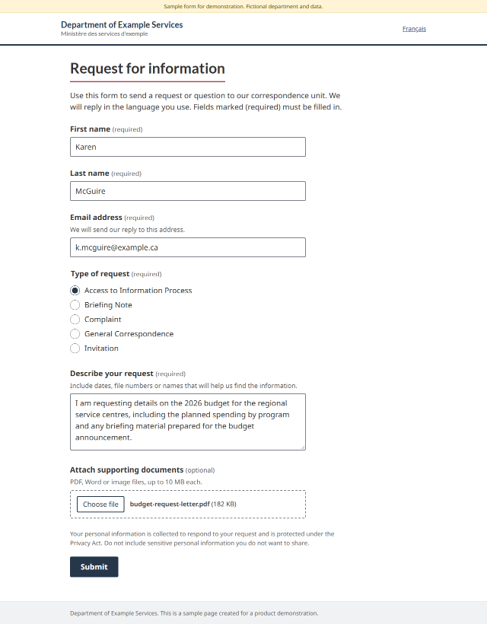
In our demo, we submitted a request through a public form: a name, an email address, a request for details about a budget, and attached files. Shortly afterward, an email notification confirmed that a new submission had been created, with its request number.
We refreshed ccmEnterprise, and the record was there. Its metadata fields were populated, the submitter’s details were filled in, and the original form content sat alongside them. From public submission to record, nobody touched the data.
Keep GC Forms exactly as it is
You do not rebuild your forms. ccmIntake is configuration, not custom development. And it is not only for the public: use GC Forms to automate intake for internal requests too. Complex forms work as well. One of our federal customers has a large, multi-page application form in GC Forms that is already accessible and has passed security review.
Why it matters
When a request arrives, you want it in front of an owner within minutes, not days. With every submission in ccmEnterprise, an ATIP answer becomes one search instead of a hunt through inboxes and download folders. Your team also stops being the link between a form tool and a records system. Retention and custody stay with your department, where they belong.
Try it with your own form
Want to see your data flow into ccmEnterprise? We can build a mock-up form in GC Forms for your department, so you can watch a real submission become a real record.
If you joined our October 20 Focus Group, you saw this live. If you missed it, watch the demo here: ccmIntake for GC forms