



What Is an OPRA Request? (Complete Guide for 2026)
Here’s the short version—before things get messy.
An OPRA request is a formal way to ask for government records in New Jersey under the Open Public Records Act. It allows anyone—not just journalists or lawyers, but regular people too—to access documents held by public agencies like municipalities, school boards, and state departments. We’re talking emails, contracts, reports, meeting minutes—the paper (and digital) trail behind how decisions get made.
Why does this matter? Because without access, transparency is just a nice idea on paper. OPRA is one of the tools that turns that idea into something real—something you can actually use.
Of course, in practice, it’s not always that clean. Requests pile up. Deadlines loom. Agencies juggle dozens—sometimes hundreds—of inquiries at once, which is exactly why many now rely on software to track, manage, and respond to OPRA requests without things slipping through the cracks.
But we’re getting ahead of ourselves. Let’s break it down properly.
What Does OPRA Request Mean?
At its simplest, an OPRA request is just a formal way of saying: “I’d like to see that government record.” No drama. No special credentials. You don’t even need to explain why you’re asking—which, honestly, feels a bit unusual in today’s world.
Legally, it comes from New Jersey’s Open Public Records Act (OPRA), a law designed to give the public access to government-held information. It requires agencies—municipal offices, school boards, state departments—to respond within a set timeframe (typically seven business days). They can approve, deny, or ask for clarification, depending on what’s being requested.
Now, what counts as a “public record”?
Broadly speaking, it’s any document or data created, received, or stored by a public agency while doing official business. Not just paper files—digital records absolutely count too. Emails, databases, PDFs, all of it.
Common examples include:
- Emails between government employees
- Contracts with vendors or consultants
- Reports like audits or internal reviews
- Meeting minutes documenting official discussions
That said, not everything is accessible. Some records are exempt—think personal privacy, legal matters, or ongoing investigations.
Still, OPRA covers more than most people expect. And when used well, it can open doors that would otherwise stay firmly shut.
Who Can File an OPRA Request?
Short answer? Almost anyone.
You don’t have to be a New Jersey resident to file an OPRA request. Out-of-state individuals, businesses, even curious researchers can submit one. It’s not some locals-only club.
Journalists use OPRA all the time—but they’re hardly the only ones. Everyday citizens, advocacy groups, law firms, small business owners… it’s a pretty wide mix. Honestly, if you can fill out a form or send an email, you’re in.
And here’s the part people tend to overthink:
you don’t need to explain why you’re asking.
No justification required. No “valid reason” test. You could be investigating something serious—or just trying to understand how your town spends money. Either way, the law doesn’t ask questions.
That said, how you phrase your request still matters. A lot.
But we’ll get into that next.
What to Ask for in an OPRA Request
This is where things either go smoothly… or fall apart.
If you’re wondering what to ask for in an OPRA request, the golden rule is simple:
be specific—but not painfully narrow. It’s a bit of a balancing act.
Ask for “all documents related to government spending,” and you’ll likely get pushback (or a very long wait). But ask for “invoices related to road repairs from January–March 2025,” and now you’re speaking their language.
Common types of records you can request
- Financial records – budgets, invoices, expenditures
- Communications – emails, sometimes texts (depending on context)
- Policies and procedures – internal guidelines, official rules
- Incident reports – police reports, workplace incidents, complaints
A few practical tips (learned the hard way)
Use date ranges whenever possible. It narrows the search and speeds things up.
Name specific departments or individuals if you can—“emails from the zoning department” is far better than “all emails.”
And maybe the biggest one: avoid vague language. Words like “any,” “all,” or “related to” can open the door too wide, and that’s when requests get delayed or denied.
Clarity wins. Almost every time.
How to File an OPRA Request (Step-by-Step)
Alright—this is the part most people overthink. It’s not complicated, but there are a few places where things can go sideways if you’re not careful.
If you’re trying to figure out how to file an OPRA request, here’s the straightforward path.
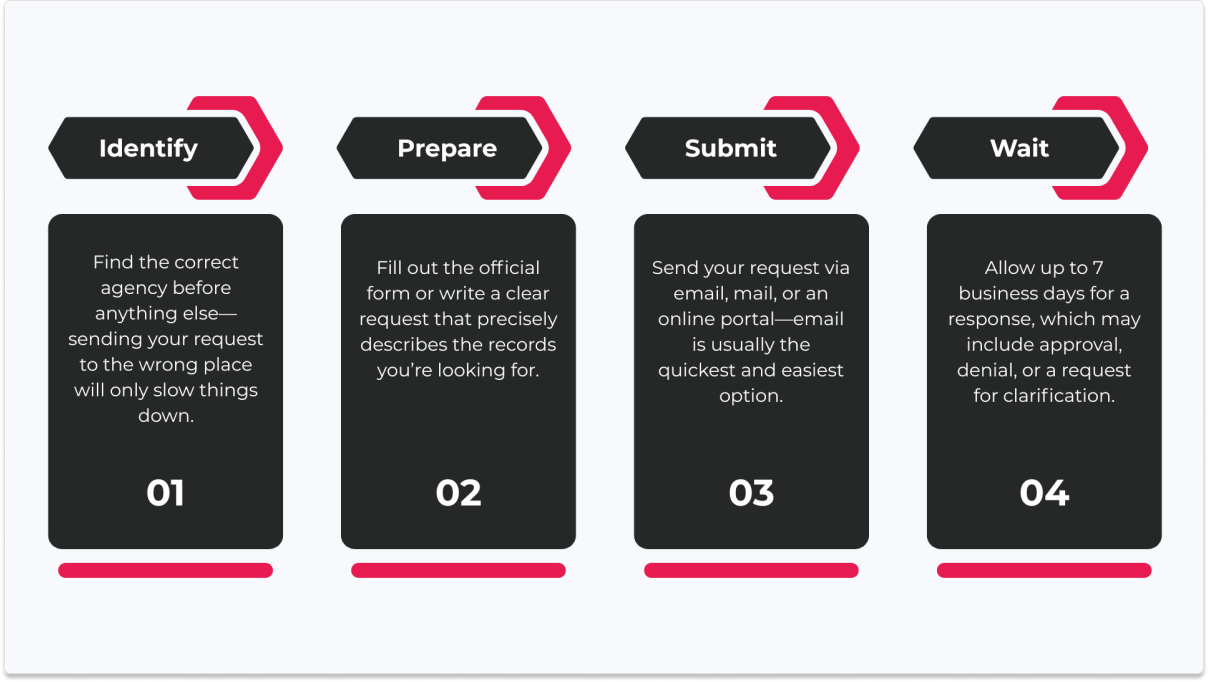
Step 1 – Identify the Correct Agency
Start here. Seriously.
You need to send your request to the right agency, or you’ll lose time fast. State departments handle statewide matters; municipal offices deal with local issues like zoning, police, or town budgets.
Sounds obvious, but people mix this up all the time.
Step 2 – Complete the OPRA Request Form
Most agencies provide a standard OPRA request form—you can use that, and it’s usually the easiest route.
That said, you’re not locked into it. A written request (email or letter) works too, as long as it clearly describes what you’re asking for. Just don’t get too fancy with the wording. Clear beats clever.
Step 3 – Submit Your Request
You’ve got options:
- Email (fastest, and honestly the most common now)
- Mail (a bit old-school, but still valid)
- Online portals (some agencies have dedicated systems)
Pick what works. Email is usually the path of least resistance.
Step 4 – Wait for a Response
Now comes the waiting game.
By law, agencies typically have 7 business days to respond. They might approve it, deny it, or come back with questions. Sometimes they’ll request an extension—especially if the request is large or, well, complicated.
It’s not instant. But it’s structured. And that makes all the difference.
OPRA Request Examples (Templates)
Sometimes it’s easier to just see it.
You can read all the rules in the world, but when it comes to OPRA, a good example saves you a lot of second-guessing—am I wording this right? too vague? too formal? Yeah, that feeling.
Here are a couple of simple templates you can tweak.
Simple OPRA Request Example
This works when you know exactly what you want:
Subject: OPRA Request
Hello,
I am requesting copies of invoices related to road repair work conducted by the Department of Public Works between January 1, 2025 and March 31, 2025.
Please provide these records in electronic format if available.
Thank you.
Detailed OPRA Request Example
Use this when the request is a bit more layered:
Subject: OPRA Request
Hello,
I am requesting all email communications between members of the Zoning Department and [Specific Individual Name] regarding permit approvals for 123 Main Street from June 1, 2024 through September 30, 2024.
Additionally, I am requesting any related reports or internal memos connected to these communications.
Please provide responsive records electronically.
Thank you.
Notice how it narrows things down—dates, names, topic. That’s intentional.
Email vs. Form Format
You’ve got two main ways to submit:
- Email – flexible, quick, and honestly preferred by most people
- Official OPRA form – structured, sometimes required by certain agencies
Both are valid. Some agencies lean heavily on their forms, others don’t care as long as the request is clear.
If you’re unsure? Check their website first. Saves a headache later.
What Happens After You Submit an OPRA Request?
So—you’ve hit send. Now what?
First, there’s usually an acknowledgement. Not always immediate, but most agencies will confirm they received your request. Sometimes it’s a quick email. Sometimes… silence for a day or two, which can feel longer than it actually is.
Then comes the real response.
Email vs. Form Format
Agencies typically respond in one of three ways:
- Approval – they found the records and will provide them
- Denial – the records are exempt, unavailable, or the request doesn’t meet requirements
- Clarification request – this one’s common; if your request is too broad or unclear, they’ll ask you to tighten it up
That last one isn’t a rejection—it’s more like, help us help you.
Fees (Yes, Sometimes)
Not always, but occasionally you’ll run into fees.
- Small charges for copies
- Larger ones if extensive staff time is needed (labor costs)
Digital records? Usually cheaper—or free. Physical copies? That’s where costs can creep in.
How You’ll Receive the Records
Most of the time, records are delivered electronically—PDFs, spreadsheets, email files.
But in some cases, especially older records, you might get physical copies or even be asked to pick them up.
It varies. A lot depends on how the records are stored—and how old they are.
Common Reasons OPRA Requests Are Denied
Here’s the part no one really enjoys talking about.
You submit a request, wait the required time, maybe check your inbox a few too many times—and then… denied. It happens. More often than people expect, actually.
But it’s usually not random.
Exempt Records (Privacy, Security, Legal)
Some records are simply off-limits. By law.
Things involving personal privacy, sensitive security details, or legal protections (like attorney-client privilege) can’t be released. Even if your request is perfectly written, these exemptions will stop it cold.
It’s frustrating, sure—but not negotiable.
Overly Broad or Unclear Requests
This one trips people up all the time.
If your request is too vague—“all documents related to…”—agencies may deny it or push back for clarification. They’re not going to dig endlessly through records without a clear scope.
And honestly, from their perspective, that’s fair.
Ongoing Investigations
If the records are tied to an active investigation, access is usually restricted. Releasing that information too early could interfere with the process.
So even if those records might become available later, right now? Off the table.
OPRA Requests for Government Agencies (Operational Perspective)
From the outside, OPRA feels simple—submit a request, get a response. Clean. Linear.
Inside a government office? Not even close.
Requests don’t arrive one at a time. They come in waves. Emails, forms, follow-ups—sometimes dozens in a single week, sometimes more. And each one has a clock attached to it. Seven business days sounds reasonable until you’re juggling twenty requests at once, all asking for different records, stored in different places, owned by different departments.
That’s where things start to strain.
The real challenge: tracking and routing
An OPRA request rarely lives in one inbox.
It gets routed—to legal, to records management, to specific departments. Someone has to track where it is, who touched it, what’s been found, what’s missing. Miss a step, and suddenly you’re risking delays… or worse, non-compliance.
And compliance matters. A lot.
Why workflow and record management matter
Without structure, it’s chaos. Spreadsheets, email chains, sticky notes—people patch together systems just to keep up.
But increasingly, agencies are moving toward something more reliable.
Systems that centralize requests, track deadlines, route tasks automatically, and store documents in one place. Not flashy, but effective. These tools help teams respond faster, stay organized, and—maybe most importantly—avoid costly mistakes.
Because at scale, OPRA isn’t just about access.
It’s about managing that access—properly, consistently, and on time.
How OPRA Records Software Helps
At some point, spreadsheets stop cutting it.
You can only track so many requests in email threads and shared folders before things start slipping—deadlines missed, documents misplaced, someone forgetting to follow up. It happens. Even in well-run offices.
That’s where OPRA records software quietly steps in.
Centralized request tracking
Instead of requests scattered across inboxes, everything lives in one place. A single dashboard. You can see what’s pending, what’s overdue, what’s already fulfilled—no guesswork, no digging through old emails at 4:45 PM on a Friday.
Workflow automation (and a bit of sanity)
Requests get routed automatically to the right departments. Deadlines are tracked. Notifications go out without someone having to remember every single step.
It’s not magic, but it feels close.
Document management and reporting
All related documents—emails, reports, attachments—are stored together, tied to the request. Need to pull a report on response times or request volume? Done in a few clicks, instead of hours of manual tracking.
Better compliance, faster responses
When everything is organized, responses get faster. More consistent, too. And compliance—arguably the biggest pressure point—becomes manageable instead of stressful.
And this is where systems like ccmEnterprise come into play. They bring correspondence, documents, and workflows into a single, structured environment—making it easier to track OPRA requests, route them properly, and generate reports without reinventing the wheel every time.
Because at the end of the day, it’s not just about handling requests.
It’s about handling them well.
OPRA vs FOIA: What’s the Difference?
People mix these up all the time. Fair enough—they’re cousins, not twins.
At a glance, OPRA and FOIA do the same thing: they give the public access to government records. Transparency, accountability, all that good stuff. But where they apply—and how they work—differs more than you’d think.
State vs. Federal
Here’s the cleanest way to think about it:
- OPRA = New Jersey state law
- FOIA (Freedom of Information Act) = federal law
So if you’re requesting records from a local NJ agency—like a city office or school board—you’re using OPRA.
If you’re going after a federal agency—think FBI, EPA, Department of Defense—that’s FOIA territory.
Different levels of government, different rules.
Jurisdiction matters (a lot)
You can’t use OPRA to request federal records, and FOIA won’t help you with local NJ documents. It’s a bit like showing up at the wrong counter—no matter how well you ask, you won’t get what you need.
And yes, each state has its own version of OPRA. Different names, slightly different rules. It’s not one-size-fits-all.
Same goal, different systems
Despite the differences, both laws are built on the same idea:
the public has a right to know what the government is doing.
How you get that information—that’s where things diverge.
But the intention? Pretty much identical.
Final Thoughts: Understanding OPRA Requests
So, stepping back for a second—what’s the takeaway here?
An OPRA request isn’t some complicated legal maneuver. It’s simply a tool. A way for the public to access government records, ask questions, and—when needed—hold agencies accountable. It applies to New Jersey public bodies, covers a wide range of documents, and doesn’t require you to justify why you’re asking.
But—and this is important—it works best when you use it well.
Vague requests slow things down. Overly broad asks get pushed back. The difference between a smooth response and a frustrating one often comes down to how clearly you frame your request. Specific dates. Defined departments. Direct language. It’s not fancy, but it’s effective.
And on the agency side, managing all of this? That’s a whole different challenge.
If you’re part of a government team handling OPRA requests regularly, the volume alone can become overwhelming. That’s where having the right systems in place makes a real difference—not just for efficiency, but for compliance and consistency too.