


How Can AI Improve Decision-Making in Government?
Government decisions rarely fall apart because people don’t care. Usually, it’s the opposite. People care quite a lot. The trouble is volume. Too many emails. Too many requests. Too many attachments with names like FINAL_v2_revised_REALFINAL. And somewhere in that mess, an urgent issue is waiting for the right person to notice it before lunch, or tomorrow, or next week if things really go sideways.
That’s the backdrop for almost every conversation about AI in government decision making. Not robots running city hall. Not some sci-fi control panel blinking in a dark room. Just a very real, very familiar problem: public institutions are expected to respond quickly, document everything properly, communicate clearly, and make fair decisions while drowning in information. It’s a lot. Frankly, more than many teams can handle with manual processes alone.
So, how can AI improve decision-making in government? In the most useful sense, it helps by sorting the signal from the noise. It can pull key facts from incoming messages, group similar requests, flag urgent issues, summarize long threads, and steer information to the right team faster. That may sound almost boring—and that’s kind of the point. The biggest gains often come from fixing the unglamorous bottlenecks that slow government work to a crawl.
And there’s another wrinkle here. Better decisions usually start earlier than people think. They don’t begin in the meeting room, or with the ministerial briefing, or when someone opens a dashboard full of charts. They begin at intake. With the first email. The first citizen complaint. The first service request. If that information arrives half-buried, misread, or routed to the wrong place, the decision that follows is already wobbling a bit.
That’s where artificial intelligence in government services starts to get interesting. Not as a replacement for judgment—let’s not get carried away—but as a practical support layer. A smart filter. A tireless organizer. A way to help public servants spend less time shuffling paperwork, digital or otherwise, and more time weighing trade-offs, spotting patterns, and deciding what actually needs to happen next.
In other words, AI isn’t most valuable when it tries to think instead of government. It’s valuable when it helps government think more clearly, and move a little faster, with fewer dropped balls.
What AI in Government Decision Making Actually Means
“AI” is one of those terms that gets puffed up fast. People hear it and picture some all-knowing machine calling the shots. That’s not really the useful version—certainly not in government.
In practice, AI in government decision making usually begins with the plain, workaday stuff. The inbox stuff. The repetitive stuff. It helps classify incoming correspondence, summarize what’s in a long email chain, extract key details from forms or attachments, and prioritize requests based on urgency, topic, or service area. Sometimes it can draft a response, or at least give staff a solid starting point. Sometimes it can trigger a workflow automatically so the request lands with the right team instead of bouncing around the building like a lost library book.
That matters more than it may seem at first glance. Good decisions rarely appear out of thin air; they depend on good inputs. If a request is captured properly, routed quickly, and understood early, the people making decisions are already in a better spot. Less guesswork. Fewer delays. Fewer things slipping through the cracks.
That’s why artificial intelligence in government services isn’t just about chatbots or flashy public tools. It can strengthen front-end communication with citizens, yes, but it can also tighten up the back-end machinery—intake, routing, records, follow-up—the parts nobody applauds, though they keep the whole show on the road.
How Can AI Improve Decision-Making in Government? 6 Core Ways
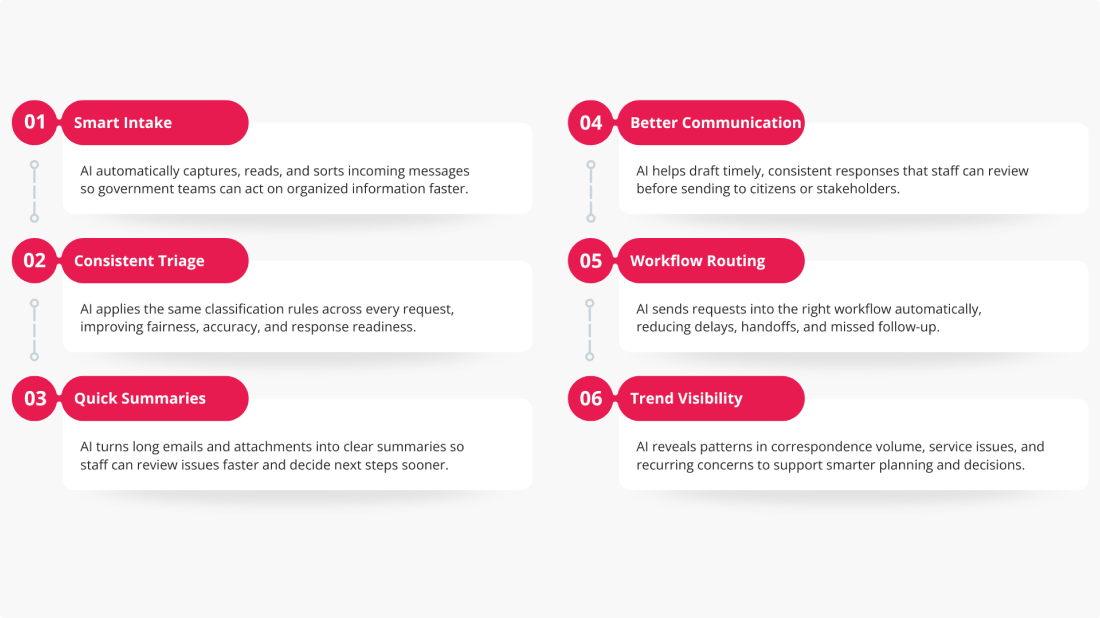
1. Faster Intake and Triage of Incoming Requests
A lot of government work begins in the inbox. That’s not glamorous, but it’s true. Complaints, service requests, public feedback, ministerial correspondence—they all arrive fast, often in messy batches, and someone has to make sense of them.
AI can help by monitoring email channels and processing incoming messages automatically. It can pull out the sender, subject line, body content, and attachments, then sort correspondence by type before a staff member ever opens it. That means decision-makers get organized, routed information sooner, which is often half the battle.
2. More Consistent Classification and Prioritization
Manual intake tends to vary from person to person. One employee marks something urgent, another calls it routine, and a third sends it to the wrong team entirely. It happens. More than anyone likes to admit.
AI can apply the same logic across large volumes of correspondence, which makes classification more consistent and prioritization more reliable. In government, that matters for everything from complaints and public feedback to briefing note requests and ATIP-related correspondence. The upside is pretty straightforward: more fairness, more consistency, and fewer avoidable delays.
3. Better Summaries for Faster Review
Some emails are short. Many are not. Some come with lengthy attachments, forwarded chains, and just enough context to make things confusing instead of clear.
AI can generate concise summaries of incoming correspondence and supporting documents, giving managers and analysts a quicker way into the issue. That’s especially useful when staff need to assess urgency, identify the subject matter, or determine which branch should own the file. It doesn’t replace judgment, obviously, but it can save people from wading through the same swamp of text over and over again.
4. Stronger Government Communication
This is where things become more visible to the public. AI in government communication can help draft acknowledgements, status updates, and response language that staff then review, edit, and approve. Used properly, it supports faster communication without cutting humans out of the loop.
That last point is important. Human review still matters, especially when the stakes are high or the message is sensitive. Still, the benefit is real: citizens get quicker responses, teams use more consistent language, and communication feels less patchy, less improvised, less “we’ll get back to you eventually.”
5. Improved Workflow Routing and Follow-Through
Once correspondence has been categorized properly, it can be routed into the right workflow automatically. That sounds simple—and in a way it is—but it has a ripple effect across the whole operation.
Better routing reduces misdirection, cuts down on handoffs, and helps requests reach the right team faster. In practical terms, better intake improves downstream decision execution. If the wrong people get the issue late, the final decision is late too. That’s just how the dominoes fall.
6. Better Visibility into Patterns and Trends
When incoming correspondence is captured consistently, agencies can start seeing the bigger picture. Not guesses. Actual patterns.
They can identify recurring themes, spikes in demand, service bottlenecks, or emerging issues that may otherwise stay hidden inside thousands of individual messages. AI-supported intake also creates cleaner operational data for dashboards and reporting. And better reporting, while hardly thrilling dinner-table conversation, helps leaders make smarter decisions about policy, staffing, and resource allocation.
Real-World Government Use Cases for AI
You don’t have to squint very hard to see where this becomes useful. In government, the first and most obvious use case is executive correspondence management—high-volume inboxes where inquiries, complaints, briefing note requests, public comments, and ATIP-related messages arrive in a steady stream and need to be sorted fast. WorkDynamics describes this kind of setup pretty plainly: incoming emails can be captured automatically, categorized by type, and pushed into the right ccmEnterprise workflow instead of waiting for manual review.
That same model applies to complaint and inquiry intake, ministerial or departmental email triage, and public feedback management. Rather than having staff manually read, classify, and re-enter everything, the system can extract key details, generate a draft reply, and route the item onward for processing. That’s where AI in government communication starts to feel less theoretical and more practical.
There’s also a strong fit for intake tied to forms, submissions, and service requests, especially when records must be created consistently and stored properly. On the back end, artificial intelligence in government services can support records creation, attachment handling, workflow execution, and compliance-oriented document storage—whether that means local archiving, SharePoint storage, or broader records management inside ccmEnterprise.
In other words, it’s not just about answering emails faster. It’s about turning incoming information into usable, trackable government work.
AI Ethics in Government: Why Trust Matters
This is where the conversation gets serious—and it should. AI ethics in government isn’t some decorative policy appendix nobody reads after page 47. It’s the part that determines whether people trust the system at all.
Governments handle sensitive information, public-facing decisions, and services that can affect people’s rights, access, and day-to-day lives. So the bar is higher. As it should be. That means any use of AI needs to rest on a few sturdy principles: transparency about where it’s being used, human oversight over important outcomes, fairness in how requests are handled, accountability for the final decision, and explainability where the context calls for it. Not every internal process needs a dissertation attached to it, but people should be able to understand the role the system played.
And that’s the line worth drawing clearly: AI should support officials, not make unreviewed high-stakes judgments on their behalf. Its sweet spot is narrower, and frankly more useful—triage, recommendations, summaries, and draft generation. The assistive layer. The first pass. The “here’s what seems to be happening” stage.
For public-facing decisions and communications, human-in-the-loop review matters. A lot. Citizens shouldn’t be left guessing whether a life-affecting decision came from a black box no one can properly explain.
Trust grows when agencies define the boundaries upfront: here’s where AI helps, here’s where people step in, and here’s who remains accountable. That kind of clarity goes a long way. Maybe farther than the technology itself.
AI and Data Privacy in Government
Privacy is where a lot of public-sector AI conversations either gain credibility or lose it, fast. And honestly, that makes sense. When people talk about AI and data privacy in government, they’re not speaking in abstractions. They’re talking about inboxes full of sensitive correspondence, personal information in attachments, records that must be stored properly, and systems that need to stand up to scrutiny later—not just work nicely in a demo.
That’s why privacy has to be built into the design from the start. In practical terms, that means controlled access, strong authentication, clear auditability, disciplined records handling, and defined retention rules. WorkDynamics’ AI automation materials point in that direction: the solution authenticates through Microsoft Graph using application permissions, calls for secure handling of tokens and credentials, and supports local archiving, SharePoint-based remote archiving, configurable retention policies, and automatic cleanup of temporary files. It also ties processed email information into ccmEnterprise workflows and record management rather than leaving content floating around in disconnected tools.
There’s an important architectural point here too. The model is designed around an agency-owned environment. WorkDynamics describes the automation as something that can run alongside the customer’s existing server environment, while connecting to Microsoft 365 email accounts through Microsoft Graph and interacting with SharePoint and ccmEnterprise as needed. That matters, because privacy controls are much easier to enforce when the agency owns the infrastructure, access model, and records process.
Put simply: privacy can’t be bolted on after deployment. In government, it has to be part of the blueprint.
Challenges of AI in Government
For all the promise around automation, the challenges of AI in government are pretty ordinary—and that’s exactly why they matter. They’re not usually futuristic problems. They’re operational ones. Change management is a big one. Teams already have established intake habits, approval paths, and compliance routines, so even a useful tool can run into resistance if people don’t trust it or don’t see where it fits.
Data quality is another sticking point. If incoming correspondence is inconsistent, poorly routed, or missing context, classification accuracy will suffer too. WorkDynamics’ own materials acknowledge that categorization can be difficult and that errors in manual classification cause delays, which is really another way of saying the intake problem has to be cleaned up before automation can shine.
Then there’s governance. Public-sector teams have to work through policy requirements, privacy and security reviews, and questions about accountability before AI can move from pilot to production. Integration can also get messy, especially where older systems, custom workflows, or external repositories are involved. And yes, cost and scale matter. WorkDynamics notes that Azure OpenAI usage is pay-per-use and rises with volume, which means agencies have to think realistically about workload and budget from the start.
That’s why not every use case needs full generative AI on day one. In fact, WorkDynamics explicitly describes a phased approach: agencies can start by automating the workflow itself—using keyword-based classification or even human pre-sorting—then add AI where it clearly improves outcomes.
That approach makes sense. Automate first. Add intelligence where it earns its keep.
Best Practices for Responsible AI Adoption in Government
The smartest approach is usually the least flashy one at the start. Pick a narrow, high-volume use case first—something like correspondence intake, complaint routing, or ministerial email triage—where the pain is obvious and the results are easy to measure. WorkDynamics’ pilot case makes that logic pretty clear: the win came from modernizing a repetitive intake process, reducing processing time, improving consistency, and giving staff more room for higher-value work like policy support and stakeholder engagement.
From there, keep humans in the approval loop. That matters both for trust and for quality. WorkDynamics repeatedly frames the model as assistive rather than hands-off: the system can categorize, summarize, and draft, but staff remain in control of the communication and can review or change outputs before anything moves forward.
It also helps to define the basics clearly before rollout: categories, workflows, approval points, and success metrics. Otherwise, even good automation gets muddy fast. And yes, privacy and compliance requirements have to be baked in from the outset, not taped on later.
One practical habit that often gets overlooked: audit the outputs. Review the classifications. Tweak the prompts or instructions. Refine the routing logic. Measure what actually matters—processing time, routing accuracy, response consistency, and staff time saved.
A phased model makes the most sense here. Start with intake automation. Then add AI classification. After that, AI summaries, draft responses, and finally reporting and optimization. WorkDynamics’ own positioning leans that way: automate first, then add AI where it clearly improves the outcome.
Conclusion: AI Should Strengthen Government Judgment, Not Replace It
So, back to the central question: how can AI improve decision-making in government? Mostly by making the machinery around decision-making work better. It speeds up intake, improves consistency, supports clearer communication, surfaces useful patterns, and cuts down the manual grind that pulls staff away from more important work.
That doesn’t mean AI should be handed the wheel. Not even close. In government, responsible adoption still depends on ethics, privacy, and human oversight—those aren’t side issues, they’re the guardrails. AI works best when it helps public servants review information faster, respond more consistently, and act with better context, while people remain accountable for the decisions that matter.
And really, that’s the sensible path forward. Agencies don’t need to start with sweeping transformation or some moonshot technology strategy. They can begin with a practical problem right in front of them: correspondence and intake. For organizations looking to modernize those processes, workflow-driven automation offers a grounded place to start—one that improves service now and creates a stronger foundation for AI later.