



What Is Case Management Software? A Complete Guide for Modern Organizations
It usually starts with a question nobody wants to ask.
“Who’s handling that file?”
“Did we respond?”
“Where’s the latest version?”
And suddenly three people are digging through inboxes like they’re panning for gold in 2009 Gmail threads. There’s a spreadsheet involved. There’s always a spreadsheet. It’s half-right. Maybe.
That’s when organizations start asking, what is case management software?
In plain terms, case management software is a structured system used to track and manage individual cases — complaints, investigations, legal matters, compliance reviews, client requests — from intake to resolution. It centralizes the work, assigns ownership, documents every step, and keeps a verifiable history of what happened and when.
It’s not just task tracking. It’s not a glorified email folder. It’s the operational framework that ensures structured work moves forward without vanishing into chaos.
Because at a certain scale, “we’ll keep track of it manually” stops being scrappy — and starts being risky.
What Does a Case Management Software Do?
If the first section was the “why,” this is the machinery. The nuts and bolts. The part where things actually move.
Because at the end of the day, case management software isn’t theoretical. It does work. Quietly. Consistently. Without losing the thread.
It Captures Intake
Everything begins somewhere.
An email lands in a shared inbox. A web form gets submitted at 2:14 a.m. A complaint arrives through a public portal. Sometimes — yes — someone just types it in manually because that’s still how the world works.
Case management software gathers those entry points and funnels them into one structured system. It assigns a case number. It categorizes the submission. It captures key metadata — date received, sender, case type, priority — without someone having to invent a naming convention on the fly.
In more advanced setups, intake can be automated. Emails are classified. Forms are mapped to fields. Cases are created before anyone even opens Outlook. It’s less scrambling, more system.
And that shift matters.
It Routes Work Automatically
Once a case exists, it has to go somewhere.
Instead of forwarding emails and hoping the right person sees them, the system assigns tasks to specific users or teams. Predefined workflows determine the path — review, investigation, approval, closure. It’s structured, but not rigid.
Need flexibility? Good systems allow ad-hoc routing too. Because sometimes the real world refuses to follow the flowchart.
The key difference is visibility. You don’t wonder who owns the file. You know.
It Tracks Status and Deadlines
Open. Closed. Pending. Escalated.
Every case has a state, and a case management software tracks it without guesswork. Deadlines are recorded. Service-level agreements (SLAs) are monitored. If a file lingers too long, escalation rules can nudge — or shove — it forward.
No more Friday afternoon surprises.
It Stores Documents Securely
Cases generate paperwork. Lots of it.
Attachments are stored alongside the case record. Version control prevents the dreaded “final_v3_revised_REALfinal.docx” scenario. And in many environments, integration with secure document repositories ensures compliance standards are met.
Sensitive material stays where it belongs.
It Maintains an Audit Trail
This is where spreadsheets fail.
Every update is logged. Every change is timestamped. You can see who modified a field, who added a comment, who closed the case — and when.
For regulated industries or public institutions, that audit trail isn’t just helpful. It’s essential.
It Generates Reports and Dashboards
And then there’s the part executives care about.
How many cases this quarter? What’s the average processing time? Where are the bottlenecks? Which teams are overloaded?
Case management software turns operational data into measurable insights. Not vague impressions. Actual numbers.
Which means decisions are based on evidence, not hallway conversations.
In short, what does case management software do? It replaces scattered, fragile processes with structured, visible, defensible workflows. And it does it without needing someone to remember where the spreadsheet lives.
How to Use a Case Management Software (Step-by-Step)
This is where most articles get vague. They tell you what the software can do and then quietly disappear before explaining how to actually use it in real life.
So let’s make it practical.
If someone handed you a brand-new case management system tomorrow and said, “Alright, set it up,” here’s how to use case management software without turning it into an expensive filing cabinet.
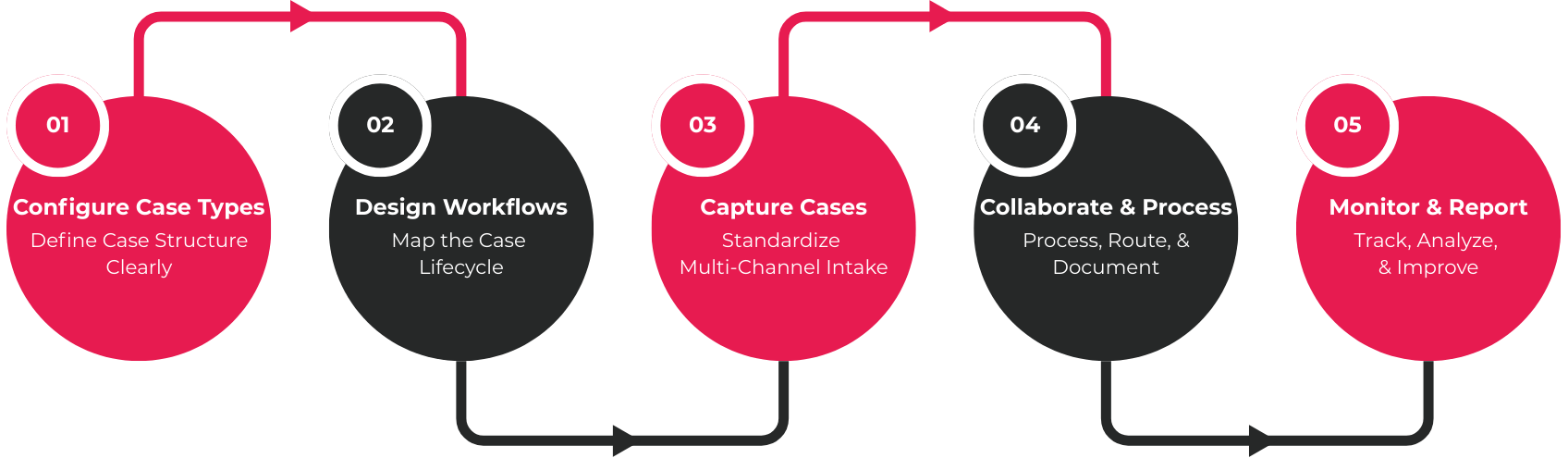
Step 1: Configure Your Case Types
Start with structure. Always.
Define what a “case” means inside your organization. Is it a Complaint? A Legal Matter? An Investigation? An ATIP request? A Permit Review? You decide.
Then map the information you actually need. Not what feels impressive — what’s required. Metadata fields like priority, department, intake date, jurisdiction, risk level. Decide which fields are mandatory and which are optional. If a complaint can’t move forward without a category and due date, make those fields non-negotiable.
This step sets the foundation. Get it wrong, and everything downstream feels messy.
Step 2: Design Workflows
Next, think through the life of a case.
Where does it start? Who reviews it? Does it require approval? Does it escalate after five days? Write it out. Then build those stages directly into the system.
Assign stages like Intake → Review → Investigation → Approval → Closure. Define approval checkpoints. Set automated notifications so people aren’t relying on sticky notes and memory.
You’re not just creating a path. You’re building guardrails.
Step 3: Capture Cases
Now plug in your intake channels.
Email inboxes. Web forms. Public portals. Manual entry for edge cases. Good systems let you apply validation rules so incomplete submissions don’t sneak through. Even better systems allow auto-categorization based on keywords or form data.
Every new case should land with a number, a category, and an owner. Immediately. No guesswork.
Step 4: Collaborate and Process
Once a case is live, the real work begins.
Users add comments directly to the record. They assign routings to colleagues. They attach supporting documents instead of emailing them around. Conversations stay inside the case. Context stays intact.
It sounds simple. It is simple. That’s the point.
Step 5: Monitor and Report
Finally, step back and look at the bigger picture.
Use dashboards to see volume trends. Track deadlines before they become problems. Generate compliance reports when auditors come knocking — because they will.
When done properly, learning how to use case management software isn’t about mastering buttons and menus. It’s about replacing invisible workflows with visible ones.
And once teams experience that shift? They rarely want to go back.
Ready to Turn Process Into Discipline?
What Is a Legal Case Management Software?
Legal work doesn’t leave much room for improvisation. Deadlines aren’t flexible. Documentation can’t be fuzzy. And “we’ll circle back to that” doesn’t usually survive in a courtroom.
So, what is legal case management software?
It’s a specialized version of case management software built specifically for handling legal matters — litigation files, regulatory enforcement actions, contract disputes, internal investigations, evidence tracking, and ongoing client correspondence. The structure looks familiar, but the stakes are higher. Everything has to be defensible.
Unlike general workflow systems, legal case management tools are designed around precision. Court deadlines must be tracked accurately — down to the day, sometimes the hour. Evidence must be cataloged in a way that preserves integrity. Documents need secure storage, with strict access controls so only authorized individuals can view or modify them.
Then there’s chain-of-custody support. That phrase alone tells you this isn’t casual recordkeeping. Systems often include detailed audit logs showing exactly who accessed a file, what they changed, and when. Not because it’s convenient — but because it’s necessary.
Access control becomes far more granular. Privileged material, sensitive investigations, and confidential client data require layered permissions. One misconfiguration can create real legal risk. No pressure, right?
There’s also a subtle difference in how these systems are used.
Government legal teams tend to prioritize compliance, transparency, regulatory oversight, and airtight documentation. Their work must withstand audits, access-to-information requests, and public scrutiny. Structure isn’t optional.
Private law firms, on the other hand, often focus equally on billing integration, matter profitability, and client communication tracking. Yes, they still need evidence tracking and deadline management — but revenue metrics sit alongside case progression.
Different environments. Different pressures.
But the answer to what is legal case management software stays consistent: it’s a structured, secure framework built to manage legal files in a way that holds up when the spotlight turns on. And in legal work, the spotlight always turns on eventually.
Why Firms Need a Case Management Software
At some point, every organization hits a wall.
It might not be dramatic. There’s no siren. No flashing red light. Just a slow realization that the current way of doing things — spreadsheets, shared drives, inbox folders labeled “URGENT_FINAL2” — isn’t holding up anymore.
And that’s usually when the conversation turns to why firms need case management software in the first place.

Manual Processes Don’t Scale
Spreadsheets work. Until they don’t.
Shared drives feel organized. Until someone overwrites the wrong file. Email tracking seems manageable. Until the volume doubles — or triples — and suddenly no one remembers which thread contains the final decision.
Manual systems depend on memory. And memory, frankly, is unreliable under pressure.
As teams grow and case volume increases, the cracks widen. Work gets duplicated. Deadlines slip quietly. People spend more time searching than solving. What once felt scrappy starts to feel fragile.
Compliance & Risk Reduction
Here’s where things get serious.
Audit readiness isn’t a theoretical concern for many firms — it’s a recurring reality. Whether it’s regulatory oversight, internal review, or public accountability, documentation has to stand up to scrutiny.
Case management software creates defensible records. Every update is logged. Every decision has a timestamp. Secure access control ensures sensitive material is seen only by those who should see it.
Documentation integrity stops being a hope. It becomes a feature.
Operational Efficiency
Efficiency isn’t just about speed. It’s about friction.
Automated workflows reduce repetitive administrative tasks. Routing happens without endless forwarding. Duplication drops because everyone is working from the same source of truth.
And yes, resolution times improve — often noticeably. Not because people suddenly work harder, but because the system removes the bottlenecks.
Improved Accountability
Clarity changes behavior.
When ownership is clearly assigned and decision history is traceable, ambiguity fades. There’s no “I thought someone else had it.” The case shows who touched it, when, and what they did.
That level of visibility isn’t punitive. It’s stabilizing.
Data-Driven Decision Making
Finally, the bigger picture.
Without structured reporting, leadership operates on anecdotes. With case management software, firms gain measurable insight: case volume trends, average processing times, recurring bottlenecks, performance metrics by team or case type.
Patterns emerge. Strategy improves. Decisions are grounded in evidence, not intuition.
And that, more than anything, is why firms need case management software. Not because it’s trendy. Not because it’s flashy.
Because once the volume rises and the stakes climb, structure stops being optional.
Case Management vs CRM vs Workflow Software
This is where things get blurry. Vendors blur it. Articles blur it. Even internal teams blur it.
On the surface, these systems can look similar. They all manage “things.” They all have dashboards. They all automate tasks.
But they are not the same animal.
| Tool | Focus |
|---|---|
|
CRM |
Customer relationships & sales |
|
Workflow software |
Task automation |
|
Case management software |
End-to-end tracking of structured cases |
A CRM is built to manage relationships — leads, accounts, communications, pipelines. It’s about revenue, retention, engagement. If your priority is closing deals or nurturing clients, that’s your lane.
Workflow software, meanwhile, focuses on automating tasks. It moves steps from A to B. Approvals, notifications, triggers. Efficient? Yes. Structured case history? Not necessarily.
Case management software includes workflow — that’s important. But it goes further. It adds structured records, compliance safeguards, documentation history, secure access control, and auditability. It doesn’t just move tasks. It preserves the life of the case.
That distinction matters.
Because if you’re managing complaints, investigations, regulatory matters, or legal files, you don’t just need automation. You need traceability. And that’s where case management software stands apart.
Modern Case Management: Automation & AI
A few years ago, “automation” meant email notifications and maybe a reminder pop-up. That was impressive. Now? Expectations are higher.
Modern case management systems are quietly integrating automation and AI in ways that feel less futuristic and more practical. Not robots taking over. Just fewer repetitive clicks.
Start with intake.
Instead of someone manually reading every email and deciding whether it’s a complaint, an inquiry, or something that should’ve gone elsewhere, automated intake classification can analyze content and assign categories immediately. The case is created. The right metadata is applied. The clock starts. No triage bottleneck.
Then there’s draft response generation. For high-volume environments — public inquiries, compliance submissions, routine legal correspondence — systems can generate structured draft replies based on templates and internal guidance. A human still reviews it (and should), but the blank page problem disappears.
Smart routing builds on that. Cases can be directed automatically to the appropriate team based on type, risk level, region, or workload. Escalations can trigger without someone having to notice that a file has been sitting untouched for six days.
Bulk imports add another layer. Large datasets from structured Excel or CSV files can be ingested into the system, creating cases at scale rather than one by one. This is particularly useful when integrating legacy records or high-volume submissions.
And integration matters. Government forms platforms, external portals, APIs — modern systems are designed to receive structured data from outside sources and convert it into actionable cases internally.
None of this replaces professional judgment.
It simply reduces the administrative drag so teams can focus on the work that actually requires it.
What to Look for in Case Management Software
Not all case management platforms are created equal. Some look impressive in a demo and then quietly fall apart under real-world pressure. So if you’re evaluating options, slow down. Ask sharper questions.
First, look for customizable workflows. Your organization’s processes are not identical to anyone else’s. You should be able to define stages, approvals, routing rules, and escalation triggers without rewriting your entire operating model to fit the software.
Role-based access control is non-negotiable. Different teams need different levels of visibility. Legal privilege, regulatory restrictions, or internal sensitivity requirements demand that access be deliberate — not accidental.
A strong audit trail is another critical feature. Every update should be traceable. Who changed it? When? What was modified? If the answer requires digging through logs manually, that’s a red flag.
Document repository integration matters too. Whether you store files in a native repository, SharePoint, OpenText, or another system, the case record should connect seamlessly to supporting documents. No copy-paste chaos.
Then there’s reporting. Dashboards should show case volume, processing times, bottlenecks, and workload distribution clearly — not buried in export files.
Scalability is often underestimated. The system should handle growth in case volume, users, and complexity without performance degrading. And yes, consider deployment flexibility. Cloud. On-premise. Hybrid. Your infrastructure matters.
Finally, integration capabilities and accessibility compliance shouldn’t be afterthoughts. APIs enable connection with external systems. WCAG compliance ensures usability for all users.
Because selecting case management software isn’t about features on a slide. It’s about choosing infrastructure that won’t buckle when your organization grows.
Final Thoughts
Strip away the jargon, and here’s what it comes down to.
Case management software is not just task tracking with a prettier interface. It’s not a digital to-do list. And it’s definitely not another system layered on top of email.
It centralizes intake. It structures workflow. It preserves documentation. It embeds compliance directly into the way work moves. That combination changes things. Cases stop drifting. Deadlines stop living in someone’s head. Records stop being scattered across drives and inboxes.
More importantly, risk drops. Accountability rises. When ownership is clear and history is traceable, ambiguity fades. And in environments where scrutiny is constant — legal, regulatory, public sector — that stability matters more than most people admit.
There’s also a quieter benefit.
Teams spend less time chasing information and more time doing the work that actually requires judgment. Investigation. Analysis. Decision-making. Not renaming files or reconciling spreadsheets at 4:57 p.m. on a Friday.
Organizations managing high volumes of structured work — from legal matters to compliance reviews — benefit most from a secure, configurable case management platform.
Because once complexity increases, structure isn’t optional. It’s foundational.